Rotary endodontic files: reading taper and system families before ordering
An endodontic file order is easy to misread when the clinic works from shorthand like “the red rotary file.” Colour alone leaves the brand, family, tip identity, taper and length unresolved. A receiver needs enough information to tell the requested instrument apart from a similar-looking file — and to recognise a manual version or an assortment when one arrives.
Build the order from the clinician’s approved system. Purchasing doesn’t select a shaping sequence or decide which instrument suits a canal; it preserves the identity of the approved file and the documents required for its use. The useful buying question is whether the supplier’s item, the stock record and the clinician’s request describe the same object.
Separate tip identity from taper
Size and taper are different fields. Preserve the notation exactly as given for the named instrument, and never reduce a catalogue designation to a colour or a single number. Copy the approved instrument’s label and request the matching product reference — don’t do arithmetic that turns a short code into an assumed universal geometry.
Taper descriptions differ between systems. A fixed taper and a variable taper are distinct inventory descriptions, and where the manufacturer uses a suffix or specific nomenclature, keep it in the quoted item. Removing it makes different instruments look equivalent in a stock spreadsheet. If a quotation drops part of the notation, ask for a labelled pack photograph.
Length is an independent field too. An order with the correct family and tip is still wrong when its length differs from the approved stock entry. Put length beside the file identity on every line, including individual refills, and make any assortment list the instruments and lengths it contains — “complete rotary set” is not a contents list.
System families describe different objects
The historical E3 families include MPro, MPilot, Msolo, Mtaper and ReRoot. Keep these names as historical inventory identifiers while checking the current supplied product and instructions. They are separate family names, not synonyms for any heat-treated nickel-titanium file, and a supplier offering a new version must identify it explicitly.
Glide-path instruments, shaping families and opener instruments are distinct identities — a product line labelled for glide-path work, such as Wayfinder in the same product documentation, is not a shaping file. This distinction earns its keep in stock organisation: separate the approved groups into labelled entries with their individual references. The purchasing team can maintain those categories without recommending an operative sequence or carrying a historical motor setting into a new order.
And don’t take a manufacturer’s family name as evidence that two generations share identical properties. Product updates need a revised label, current instructions and a clear supplier description. An older tray map stays an older tray map until the clinic approves the replacement. Record the relationship between the legacy entry and the proposed new entry instead of overwriting the name.
A current branded comparison clarifies notation
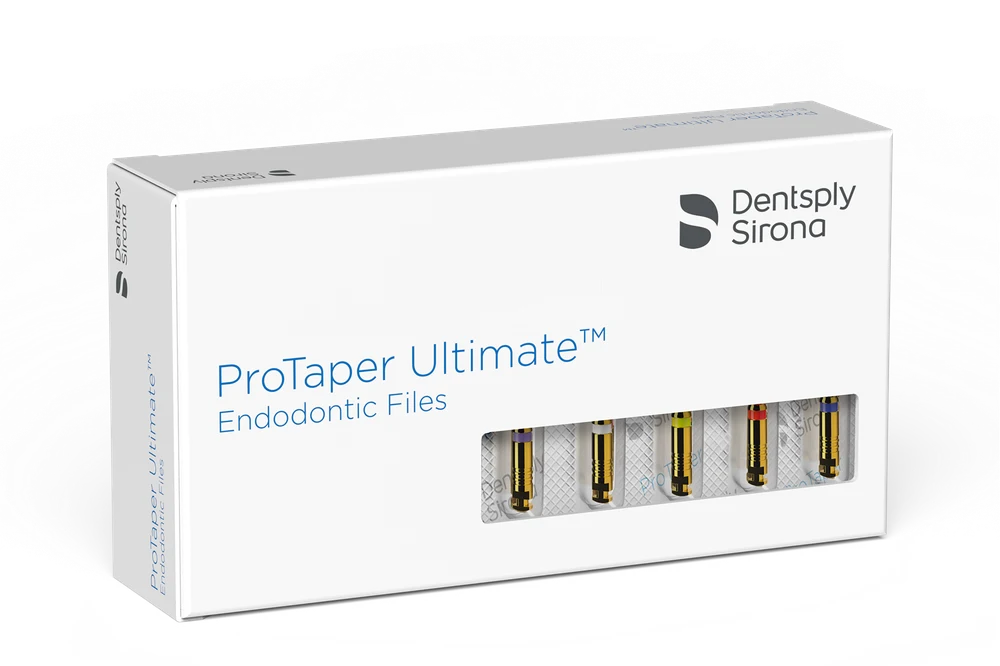
Dentsply Sirona ProTaper Ultimate identifies a Slider, a Shaper and named Finishers — concrete system identities, with product-specific size and variable-taper notation in its instrument descriptions. They make a useful example of why role, size and taper need separate fields. They do not provide a translation table for E3 instruments.
A ProTaper Ultimate rotary instrument and its manual counterpart also need different purchase entries. Similar working-part descriptions don’t identify the handle and driving arrangement. Keep manual and rotary versions distinct at quotation and at receipt, and make the pack photograph show the labelled format, not just a close-up of flutes.
System role names don’t make brands interchangeable. A Slider from one system and a glide-path file from another are separate products with separate instructions, and a named Finisher is not shorthand for every file sharing its colour. The approved system owns its role terminology, its geometry and its use documentation.
Material descriptions require product-level verification
Nickel-titanium, heat treatment, flexibility and pre-bendability are separate claims. A broad phrase like “memory alloy” identifies nothing. Ask for the manufacturer’s current material description and instructions for the exact file family, and keep promotional claims about fracture resistance or speed out of the receiving criteria.
A buyer can verify that the delivered pack carries the requested reference and an identifiable manufacturer. A buyer cannot confirm a fatigue or fracture claim from a delivery note. If the purchasing decision depends on such a claim, the responsible clinical reviewer evaluates its evidence before the product is approved. A sales comparison never becomes an assumed property of every heat-treated instrument.
Sterility and reuse status belong to the exact product as well. Record the supplied status and the instructions attached to that instrument. A file drawer holding several brands needs a product-specific register — a blanket “all rotary files” reuse or sterilization note erases exactly the distinctions the stock record exists to preserve.
Motor documentation is a dependency
The motor model, the approved file programme and the current instructions must be available to the trained team. Purchasing identifies the motor already in use and collects the documents the approved file system requires; it does not select an operating speed or torque from another brand’s file chart.
A motor programme name doesn’t verify the delivered instrument — the clinic still needs the exact file family and generation. Ask the supplier to explain any software or programme compatibility relevant to the purchase, with written product identification, and resolve those questions before a new file system becomes routine stock.
Training and configuration support can be explicit commercial deliverables: record who provides the support and which exact products it covers. Clinical operating decisions stay with the trained team. The purchase record makes information accessible without becoming a substitute treatment protocol.
Exact procurement object table
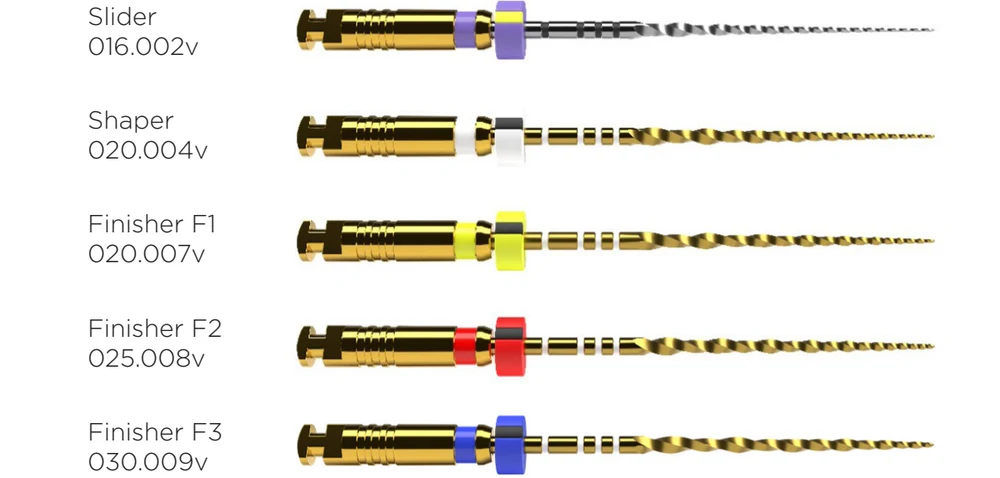
ProTaper Ultimate Slider, Shaper and Finishers, not E3 instruments.
| Purchase object | Required purchase fields | Companion requirement | Receipt evidence |
|---|---|---|---|
| Rotary file refill | Manufacturer, family, role, size, taper notation and length | Approved motor and file instructions | Sealed pack reference and labelled instrument identity |
| Manual file | Named product and manual handle format | Approved preparation inventory | Handle format and pack identity |
| Glide-path file | Exact named family, size and taper | Its own current instructions | Label distinct from shaping refills |
| Opener | Exact product family and role | Approved system compatibility review | Named pack and reference |
| Assortment | Itemised instruments, lengths and pack contents | Replenishment references for individual files | Contents matched against approved list |
| Retreatment family | Exact current product identity | Clinician-approved system and instructions | Explicit family label, not a generic rotary substitute |
| Motor support | Existing motor model and required documentation | Approved file generation and programme review | Document version and support commitment |
Use the table to create separate stock entries for each approved object. A single “endo files” entry combining manual instruments, glide-path files, shaping files and retreatment families hides both replenishment needs and ordering errors.
Mistakes in apparently equivalent offers
The first is comparing price per pack without identifying its contents. An assortment and a same-size refill serve different stock needs. Ask for the number of each named instrument, its length and its supplied status — then compare like-for-like offers against the clinic’s approved replenishment list.
The second is treating colour as the receiving decision. Colour helps trained users recognise a system, but it sits beside the printed identity, not instead of it. Require the receiver to match the full approved entry to the pack label. A close-looking colour code authorises no substitute from another system.
The third is letting historical product material stand in for current purchasing approval. If the supplier cannot establish a legacy family’s current name, reference and instructions, leave that line unresolved. The clinic can approve a documented replacement through its normal clinical review; the buyer should not reconstruct an instrument’s present specifications from old marketing text.
Compare file packs by their contents
Have the supplier return every assortment as a list of contained instruments, with family, named role, marked size and available length beside each. A pack described as “rotary set” cannot distinguish a starter assortment from a refill of one finishing instrument. Keep pack count separate from the number of distinct instrument identities inside.
Use separate fields for tip-size designation and taper description. Where the instrument has a variable taper, retain the manufacturer’s own designation and role rather than forcing it into a constant-taper stock field. If a quote offers a numeric taper without identifying the file family, request the labelled pack and current product document before comparing. A shared colour, again, establishes no equivalence between systems.
In the ProTaper Ultimate example, Slider, Shaper and Finishers are distinct roles within the named family. The purchasing list says which role is required and whether the proposed item is manual or rotary. A refill of a Finisher is not an assortment of the whole system — a distinction that lets staff identify a shortage without asking purchasing to choose a clinical sequence.
Preserve historical names without creating current specifications
An old E3 request requires the clinic’s existing pack label, catalogue reference or other retained item record. The historical family name helps locate that evidence; it does not settle what a current supplier is offering. Ask for the current labelled identity and route any proposed replacement to the clinical reviewer. Keep the historical entry visible rather than renaming it to the offered product.
At receipt, compare unopened packs by family, length and instrument role before they enter the file drawer, and record lot identity and supplied-status information. File use and reuse are governed by the applicable instructions and the clinic’s controls — nickel-titanium construction and a familiar-looking pack imply no reprocessing permission.
The motor relationship gets its own document check: record the motor model the clinic uses, obtain the relevant instrument instructions for clinician review, and don’t turn a supplier’s speed or torque message into a purchasing recommendation. The stock controller preserves the approved family and retrieves its document; clinical operation stays with the trained operator and the applicable instructions.
Endodontic file purchase checklist
- Specify the file family and named instrument role.
- Preserve marked tip-size and taper designations as separate fields.
- Distinguish variable taper from a constant-taper description.
- Record length, manual or rotary identity and each assortment’s contents.
- Resolve historical E3 requests against retained labelled item evidence.
- Check unopened pack identity, lot and supplied status information.
- Keep the approved motor relationship and current instructions available for review.
Orthentra sources from China at a transparent 3% fee. An endodontic file brief can list your approved families, roles, lengths and labelled refill identities — including any historical catalogue references that need supplier clarification — and we’ll quote exactly those objects.